


INNOVATION THAT DRIVES EMOTION THE NEXT LEVEL

h
f
f

Technology

innovation

Imagination is more important than knowledge. For knowledge is limited, whereas imagination embraces the entire world, stimulating progress, giving birth to evolution.

– Albert Einstein

unique experiences

THE NEXT LEVEL

Be unique

imagination

A lot of companies have chosen to downsize, and maybe that was the right thing for them.

We chose a different path.

Our belief was that if we kept putting great products in front of customers, they would continue to open their wallets.

– Steve Jobs

g
r
d

Read Our Blog

3 Signs that You Need to Hire an IT Consultant Right Now

Hiring a consultant can be a gamble in some cases. You don’t know how good they’re going to be or if they can help you reach your goals. But, when it comes to IT, it’s pretty easy to see how you can benefit from working with a consultant.

If you’re falling behind in technology or need to upgrade your systems but don’t have the expertise in-house, chances are you’ll need to work with an expert. But there are other signs that you could benefit from one. Let’s take a look at a few signs that you need to hire an IT consultant right now.

You’re Dealing with Fires Left and Right

Downtime can be one of the worst things you can deal with in any company. It could be caused by attacks or breaches, but it could simply be because you didn’t have the right version of a software. Or, maybe you had gaping vulnerabilities you weren’t aware of.

The beauty of working with a consultant is that they can be as involved or hands-off as you need them to be. You have outsourced IT consultants like HLB System Solutions that could help you with everything from a software update to server configuration, and help you manage your hardware’s lifecycle.

You Need Specialist Skills

You might be able to deal with minor issues from time to time, but sometimes, only an expert can help. And you may not have the resources on hand, either because they already have their hands full or they simply don’t have the expertise. This is when working with a consultant can help.

Even if you do have people in-house that are in charge of IT, there still may be some gaps in there. No matter how skilled your people are, it’s difficult to have all IT competencies internally. This is especially the case if you’re working with a different method, development language, or platform. With increased digitization and new solutions and methodologies being rolled out every year, we can expect this to happen more often.

A consultant allows you the flexibility needed to roll out new solutions without having to hire someone with that specific set of skills. They can also help update the people on your team so they can become more well-rounded.

You Need a Fresh Pair of Eyes

At their core, consultants are problem solvers. That’s what they’re trained to do. Maybe you identified an issue with your organization. You already got to the source of the problem, but you don’t know which solutions would be the best. In this case, a consultant will be able to come in with a different perspective and experience dealing with these kinds of cases. They will also have an objective opinion.

Hiring an IT consultant could be a great idea if you feel like you’re lacking the skills in-house to roll out new solutions. It’s also a good choice if you want you and your team to stay up to date with recent technologies.


3 Must-Have Security Gadgets for Mobile Devices

From trains and planes to coffee shops and cruise ships, we’ve got used to having access to the internet from almost anywhere in the world. The trouble is, it’s often too easy to forget just how vulnerable this can make us to security threats.

While internet security is much better than it used to be, there are still some things we need to do to make sure that we’re protected. For example, we should spend time making sure we only download safe and secure apps. There are also some brilliant security gadgets available to protect our mobile devices. Here’s a list of some of the most popular ones you can buy:

1.     Silent Pocket RFID Blockers

In most cases, pants and shirt pockets aren’t particularly good at blocking radio signals. This means that if you carry credit cards with embedded RFID chips in your pocket, then anyone with a scanner could access your card details without you even realizing it. And protecting your credit cards isn’t the only issue. Like the wireless RFID chips in credit cards, there are multiple wireless technologies built into our mobile phones: GPS, Wi-Fi, Bluetooth, etc.

This is where Silent Pocket RFID Blockers come in handy. These products can block all different types of signals, meaning no-one can get access to your private information. They can be purchased in a range of designs, including wallets and mobile phone covers.

2.     Apricorn Aegis Secure Key 3.0

Have you ever left your phone on the train or accidentally dropped it while traveling to a meeting? With the right skills and enough time, anyone who has access to your mobile device can hack into your information and files, even if this information is password protected. While many businesses choose to keep all their data backed up on an online storage service like Microsoft OneDrive or Google Drive, many people worry that they aren’t yet secure enough to store sensitive data. This is why lots of people choose to use USB drives instead.

But what happens if you lose the USB drive? The good news is that if it’s an Apricorn Aegis Secure Key 3.0 unless the hacker enters the correct code, there’s no chance of them accessing your secure data. You can create a code that is between 7 and 16 digits long and because this USB is unlocked before you insert it into your computer, there’s no chance of software of hardware-based keyloggers.

Talk to a provider like Iconic IT for more information on how to protect your data devices from hackers. They will discuss your needs, assess your network, and come up with a customized IT plan specific to your needs, timeline, and budget.

3.     VYSK EP1 Privacy Charging Case

The VYSK EP1 Privacy Charging Case is an iPhone case that aims to not only protect phones from being damaged but also stop data compromises. They come complete with hard shell protection and include a range of security features. For example, it includes a shutter that blocks the camera lens when not in use. This case also comes with a privacy app that encrypts text messages, photos, and videos.

Lots of people worry about the security of their mobile devices, particularly if they store personal or sensitive information on them. If you use your smartphone or mobile device for work or to store personal information, then why not try out some of the above gadgets. They will help you to ensure that all your important data is kept secure from cybercriminals.


Things You May Not Want to Do In-House in Your Company

Being self-sufficient is important for any business, especially smaller ones. But at some point, it becomes ineffective to continue doing certain things in-house if you want proper scalability. And then there are certain aspects of business operations that are best handled externally from the very beginning unless you have specific expertise in those areas. Outsourcing those things from the start and working with the right contractors can give your business a significant boost, and it’s something you should consider at the earliest opportunity.

Data Analysis

Gathering and analyzing data is one of the top priorities of many companies these days. The advance of modern analytical engines has opened the doors to significant progress in this regard. However, this is an area that requires significant experience in order to handle its problems adequately. It’s not just setting up a few data collection points and running everything through a Python script or an Excel sheet. It takes years to build up the right approach to these kinds of problems and to understand how to interpret the data you’re working with correctly. Save yourself the trouble and ensure that someone with the right level of experience is responsible for handling this.

Employee Conflict Resolution

Employee conflicts are unavoidable, no matter how much you might be striving for a non-toxic working environment. A big problem that many leaders fail to realize is that handling these issues internally can often make one side feel poorly represented. The internal politics of a company can always play a role in how those issues are approached and handled. That’s why working with an external contractor for these cases is the optimal choice. Plus, they will likely also have more experience under their belt than anyone you could handle in-house.

IT Support

Last but not least, a crucial factor in keeping things stable is how you handle your IT support. This is also something that takes time and effort to develop properly, so the best idea is often to outsource it to someone with sufficient experience. There are lots of great choices already available on the market, such as the Stronghold Services Corporation, who have been around long enough to know the field inside and out. This will also address the problem of scaling right from the start. Once your company starts growing and its requirements for IT support increase, you’ll be able to handle that with no extra effort on your side. You may not even have to negotiate a new contract, depending on which company you work with. Some of the IT support specialists on the market are well equipped for handling scaling issues.

Of course, there are also cases where the exact opposite approach is warranted. Certain aspects of business operations are best handled in-house, especially when it comes to sensitive matters involving proprietary knowledge. But in the end, the ability to tell one side from the other is one of the more important skills you can develop as a business leader. Make sure that you pay enough consideration to these situations, and don’t just go for the most obvious option without consulting everyone around you who’s also involved in the company’s leadership.

What is in a domain name?

It is impossible to overstate how much the right domain name matters. With more and more businesses starting and operating mostly or completely online, a domain name is a huge part of a company’s success.

Image Credit

Branding and recognition

A domain name is the main way for your company to communicate its purpose. Customers see your domain name before they see your website, whether this is on business cards, promotional material, vehicles, or online search results. Your domain name should immediately communicate what your business does and perhaps where it is located. This matters for two reasons: you want relevant customers to choose your website over a competitor and you don’t want to waste your marketing budget paying for clicks from an irrelevant customer because your name gives the wrong impression.

This doesn’t mean that a domain name has to be completely functional and have no character. As the front window to your business, a good domain name should ideally communicate the organisation’s character; for example, sugarartcakes.com has a very different feel to cakesbyannie.com. You have probably already thought through the values your company name communicates when you chose it, so this mostly gets tricky when the perfect domain name is already taken and you have to improvise.

Your TLD (top-level domain – the domain name ending, such as .com or .org) can help with tailoring your website. You can build in elements such as .shop or .local to customise your domain name, which in turn can help your SEO.

Image Credit

How to buy a domain name

It is easy to buy domain name from specialists such as https://www.names.co.uk/domain-names. What’s more, you can usually search available domain names and try out a few different possibilities with different TLDs before you commit to a domain name.

This also offers you the opportunity to make sure your domain name stays distinctive by grabbing the same site name with a couple of different top-level domains. This means you are less likely to lose customers to a competitor with an almost identical name or put your customers at risk of online scams whereby they are tempted to enter their details on a site they think is yours.

While there is a lot to think about when choosing a domain name, the main thing to remember is that it should be a fun and creative experience!

How to turn off dark mode on chrome

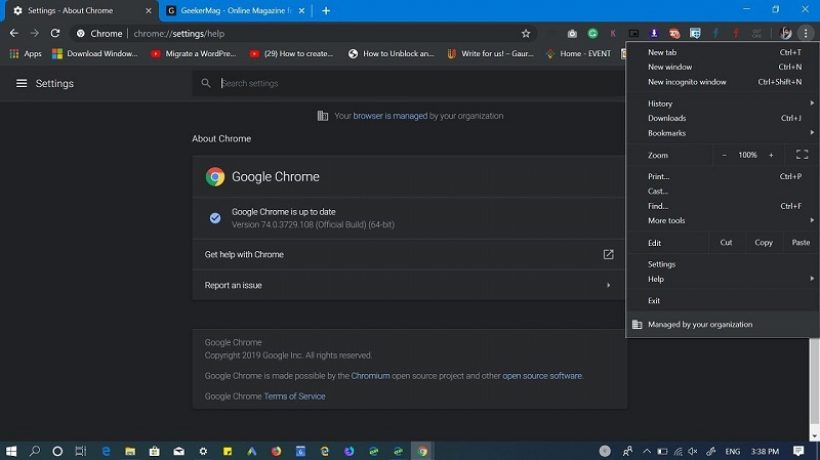
Google introduced Chrome’s dark mode in version 74 of the web browser. Without a direct way to activate it, you could force yourself with the same solution that we used in the trial versions, as we saw in this practical article.

In Windows 10 and for users who had the dark mode activated in the operating system, Google has been implementing it in phases and many users have found it activated from one day to the next. Personally, I like it, but it’s not everyone’s opinion.

A good group of users has looked for their way back without finding it in a simple way. A Google product expert confirmed the problem: “Dark mode cannot be disabled in Chrome as it is a light / dark mode setting of the operating system. ” That is, if you keep one, you have to keep the other. Officially.

How to disable Chrome’s dark mode

In the same way that we forced the dark mode in Chrome when it was not yet supported in the stable version, we can also disable it. As follows:

  • Right-click on the browser icon on the desktop and access its properties.
  • Add the command  –disable-features=DarkModeto the application target.
  • Apply and restart Chrome.

This way you can keep the general dark mode of Windows 10 and disable it in Chrome. Of course, the ideal would be to have a separate control in Chrome (or other applications). We assume that it will be implemented in the future.

Chrome’s dark mode also works in Windows 7 with the trial versions and in the browser’s incognito mode on which many of the options in this dark mode are based. For Mac, it has already been enabled in Chrome 73 and it is expected to be directly enabled in a general way for all Windows, Linux, iOS, and Android users soon.

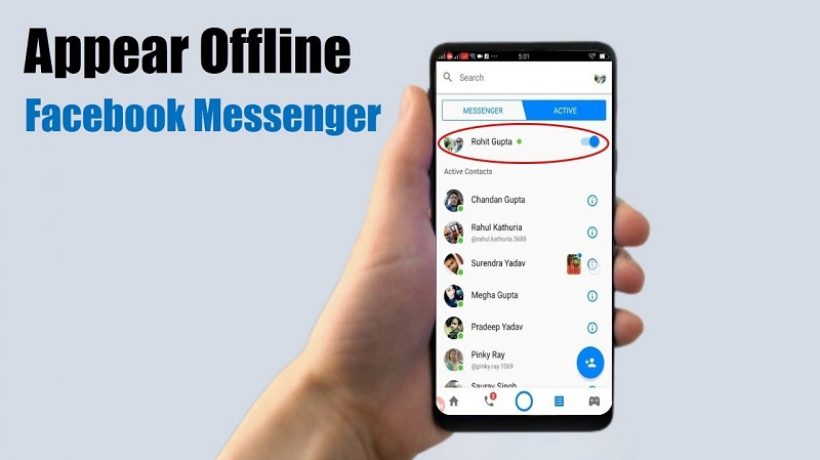
How to appear offline on Facebook

Facebook is one of the most used social networks in the world, and in addition to allowing us to share our stories, photos, or comments on its wall, it has a messaging and chats service in which whenever we enter our account we appear as connected. If you want to be able to enter Facebook and no one sees you online. Follow this step guide in which we explain how to appear offline on Facebook.

The 9 Best Bluetooth adapter for tv of 2020

For a few years now, Bluetooth technology has appeared and has conquered all fans of high-tech devices. Thus, this allows two different devices to be paired so that they harmonize their data, for better ease of use. The Bluetooth tv adapter can convert a television and even other devices into a transmitter. In this way, it can be linked to your Smartphone, for example, to receive all the data coming from the latter. If this is the first time for you to acquire this type of equipment, you will need a comparison to make your task easier. In this one, you will discover some models that really stand out. You may find the one you are looking for. In particular, you can equip yourself with theAvantree Priva III Bluetooth 4.2 Transmitter Transmitter which shows impressive compatibility in addition to promising good sound quality. There is also the Weeygo Miracast AirPlay DLNA 2.4G WiFi Screen display dongle, ideal for portable use by its mini and very light design.

5 best HDMI switch

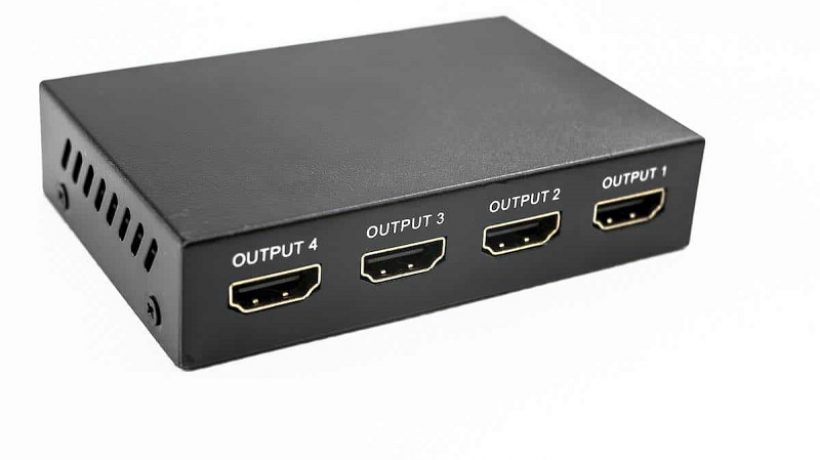
It was so annoying having to change cables every time I was going to use a different console or the Blu-Ray with the TV, that I decided to search among all of them, the best HDMI switch to be able to make a single connection and that’s it.

Surely it has happened to you too when you want the audio and video together instantly if you use any of your devices and want to change to another. For example, I needed to be able to connect the PS4, the Xbox One, the computer and the TV, so I began to inquire about the different models on the market.

There are some of course that is compatible with whatever device you can think of, but perhaps their size is too big for you and you don’t want something so visible. There are also more discreet ones, with many or few entrances, in the end, the choice is yours depending on your needs and the available budget.

The good thing is that there is a lot of variety and it is possible to find them at an affordable price and a good brand.

What is the best HDMI switcher?

If you are interested in getting an HDMI splitter to connect various devices at home, the office or even in schools, for example, an HDTV, DVD, PS3 / PS4, and Xbox One / 360, Wii, etc. It is recommended to first look at several characteristics before investing those euros in something that is not going to work for you. Check the following before:

Devices to connect

It is one of the first things that you should take into account before buying any HDMI Switch. In addition to the ones I have already mentioned, they are also compatible with HD cameras, 4K televisions, 3D devices, etc.

Inputs and outputs

In addition to compatibility, the number of devices you plan to connect must be taken into account to find a switch with the same number of ports. This is precisely the essence of investing in a device like this to avoid the work of connecting and disconnecting.

Manual or automatic transmission

It is very practical to have automatic control because with this function the splitter (as it is also called) changes the console or electronic equipment when it receives its power signal. For example, if you turn off the DVD and turn on the computer, the change will be automatic. In case you have several teams working at the same time, manual control by means of selection buttons will be more convenient.

As I have reviewed several models before getting mine, I can tell you that the comparison list below has the 5 best HDMI switches today. You can check it to have some options and you will surely find one that is cheap.

1. Kinivo 301BN High-Speed ​​HDMI Switch

It is an automatic switch that changes with the input that is active and it suits you if you have three devices to connect. It has three high-speed HDMI ports and an AC power adapter.

You can also do the manual change using the remote control with an infrared sensor included or with the button located on the device. It supports 3D.

2. Kanaan Matrix HDMI Splitter Switch Duplicator

If you need a splitter compatible with 3D and FullHD, this may be your option. Allows connection with three HDMI electronics and 2 output players. Its housing is made of resistant metal and measures approximately 135 x 90 x 25 mm. It comes with remote control and a power adapter.

3.Musou AK8-JJ0-IT-NI HDMI switch

This model is very valid for those who do not want to move a finger to change cables or have to make more connections. It has automatic and manual switching, 3 inputs for DVD, Blu-Ray, camcorder, SAT receiver, PC, Mac, XBOX 360, PlayStation 3, etc. and 1 output for LCD TV, Plasma TV, TFT, projector, HD or Full TV HD. It enables the optimal and lossless transfer of any HDTV signal.

4. HDMI Switcher WINGONEER

Those who own 4K televisions will see this splitter as an excellent option that is compatible with UHD video and also with HDMI 2.0, HDCP, 2.2, and DVI 1.0. It has high performance and is also suitable for all 3D television formats. Its measurements are 64mm x 155mm x 17mm, so it’s quite discreet if you don’t want to show it.

5. HDMI SOWTECH switch

Those who need to connect the Blue-Ray, Cable Box, PS3, Xbox360, etc. can do it with this switch which works great with all of them. It is powered by a plug and plays USB cable, therefore its installation is very simple. It can support 12-bit Dark Color and HDTV resolutions up to 4K 2160p.

Must-Have Tech Skills for College Students

The average modern college campus is literally buzzing with technology. Smartphones, computer labs, printers, cameras, tablets, laptops and more create an almost soothing white noise in the bustling hallways. And for any college student to survive, they must be fairly technically inclined on all platforms. While an IT Department does exist on campus for good reason, many people expect students to simply “figure it out” with little to no help from the Geek Squad.

So what are the must-have tech skills for a ACU Online college student to succeed?

How to Conduct Online Research

It is imperative that college students understand how to properly research online. Simply being able to type a subject into the Google search bar isn’t going to cut it when it comes to upper-level courses and work. Students need to master the art of locating credible information within various databases as well as extracting that information properly. A few helpful tips:

  • The more specific you are in your search, the more tailored the results will be
  • Use quotes to research the exact phrase or subject
  • Reliable Sources generally include those with .gov, .org or .edu in the domain

Understanding of Software Suites

Do you know how to type a document in Microsoft Word? That’s great, so can everyone else. College students need to make it a priority to master various programs within these powerful suites. PowerPoint, Excel, and Illustrator will help with studying and presentations, Adobe Photoshop, and Dreamweaver are critical to digital design while programs like Google Drive and Dropbox will help college students stay organized. Keep reading sites like omegle.

Take the time to examine the drop-down menus in each of these programs to get the most out of them that you can.

Proper Social Media/Online Communication Etiquette

Proper etiquette online is an essential skill if college students hope to land (and keep) a decent job after graduation. But while in school, it is important that students understand how to address and write emails as well as post social media content that they won’t regret later on. Professors are more willing to work with students that communicate well through emails and future employers won’t hesitate to take a gander at the type of things you post on Facebook, Twitter, or LinkedIn.

Basic Troubleshooting

Rebooting a system can fix a number of issues when it comes to technology, and the IT Department on your college campus does not want to have to tell you this over and over. Besides that, take the time to master a few of these troubleshooting basics:

  • Understand how to connect any device to Wi-Fi
  • Learn what different parts of a device are called so that you can properly describe a problem or research a solution.
  • Know how to set up proper security measures
  • Learn how to properly back up various files and the best ways to do so

Strong Typing Ability

Thought those typing classes in elementary school were a waste of time? Think again! There is a large amount of typing involved in college via emails, research papers, social media posts, and data-collecting, and having poor typing skills is only going to make this process more difficult.

Learn how to type properly and use keyboard shortcuts – it will save you so much time!

Things You Should Have In Your Car

When you purchase a new car, there are items that you should keep in there. These will be important if you have mechanical trouble, are in an accident, or are out somewhere and get injured. Here are a few must haves to equip your vehicle with.

Inside Your Car

To keep in contact with everyone, especially if you break down somewhere, you should have a smart charging cable for your cell phone. Another vital item to keep with you is a first aid kit. A sleeping bag or thick blanket will keep you warm in the winter if your battery dies and you need to wait for a tow truck. If you live in an area that gets cold, an ice scraper and snow brush should be stored in an easy to reach space so you can clear off the windows before you drive. In the event of an accident or if you are pulled over by the police, you should always have a copy of your registration and insurance card with you. The glove compartment is a great place to keep these. Also in this place, you should have the manual to your automobile and any maintenance records.

In Your Trunk

The back of your car can be a large space and some of the most important equipment is kept here. A pair of jumper cables will give your battery new life if the power drains out from it. They are also helpful if you come across a stranded motorist whose vehicle might have broken down. Ensure that you have a fully inflated spare tire and a jack ready if you have a flat. A flashlight is essential if an emergency happens in the dark. Road flares let oncoming drivers know that you are there and they should take caution while going around you. A socket wrench and other tools can help you complete minor work to your automobile so you can get back on the highway.

Comfort Items

There are basic items that may be less of a necessity than they are a comfort. If the pollen is bothering you or you have a cold, having a box of Kleenex on hand can be helpful. They can also be used to clean something in a pinch. Keep a pair of sunglasses in the car to shield your eyes from the glare. If you have small children, you can pack activity books in the backseat for them to work on while they are riding, especially if it will be a long trip.