


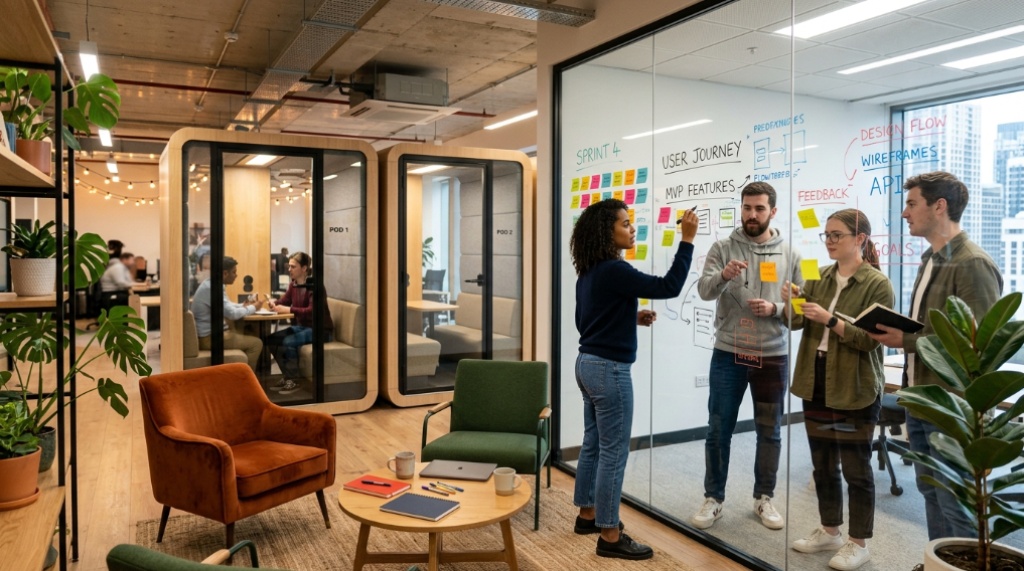
24 Sep Creating Flexible Collaboration Spaces in Modern Offices
A team of five gathers for a quick brainstorming session. An hour later, the same area needs to host a client presentation for twelve people. In a traditional office, that means moving to a different room. In a modern office with flexible collaboration spaces, it’s a matter of rearranging furniture and pulling out a whiteboard. These adaptable areas are designed to support different team activities without the constraints of fixed walls and heavy tables. Equipping them with versatile tools like magnetic dry erase whiteboards can make reconfiguration even easier. For teams looking to add a magnetic dry erase whiteboard to their collaboration toolkit, learn more here. This article explains how to design and implement flexible collaboration spaces that actually work.
Quick Answer
Flexible collaboration spaces are office areas that can be quickly reconfigured to support different types of teamwork, from small group huddles to large presentations. They rely on modular furniture, mobile writable surfaces, and adaptable technology. The goal is to maximize space utilization and accommodate diverse work styles without dedicating a separate room to each activity. Success depends on choosing the right elements and making reconfiguration easy for employees.
Key Takeaways
- Flexible collaboration spaces prioritize adaptability over fixed setups, using movable furniture and writable surfaces.
- Essential elements include modular seating, mobile whiteboards, wireless screen sharing, and acoustic solutions.
- Common mistakes include ignoring storage, power access, and acoustics, which can undermine flexibility.
- Start with a pilot area and gather employee feedback before scaling across the office.
- Measuring utilization and satisfaction helps refine the design over time.
What Makes a Collaboration Space Truly Flexible?
A flexible collaboration space is defined by its ability to change function quickly and with minimal effort. The space can shift from a formal presentation setup to an informal brainstorming circle in minutes. The key is that the reconfiguration is intuitive employees shouldn’t need to call facilities or consult a manual.
Flexibility also means supporting different work modes: individual focus, pair work, small group discussion, and large team meetings. This often requires zoning—designating areas within a larger space for different activities, with movable boundaries.
Essential Elements of a Flexible Collaboration Space

To create a space that adapts easily, you need the right mix of furniture, surfaces, technology, and environmental controls. Here are the core components.
Furniture and Layout
Modular furniture is the backbone of flexibility. Look for tables that can be easily moved or reconfigured—rectangular tables with flip-top mechanisms or casters, nesting chairs, and lightweight stools. Avoid heavy, fixed pieces. Consider standing-height tables for quick stand-up meetings and soft seating for informal conversations. Storage is critical: rolling cabinets or shelving can hold supplies and double as room dividers.
Writable Surfaces
Writable surfaces encourage spontaneous idea capture. Mobile whiteboards, glass boards, and even writable wall paint allow teams to sketch, list, and diagram without hunting for paper. Magnetic dry erase whiteboards are particularly versatile because they can hold printed materials and double as projection screens in some cases. Place them on wheels so they can be moved to wherever the collaboration is happening, When designing adaptable work environments, remember that running a successful office-based business in swindon in wiltshire relies heavily on smart layout choices.
Technology Integration
Flexible spaces need technology that works without a fixed setup. Wireless screen sharing (e.g., Miracast, AirPlay, or dedicated dongles) lets anyone present from their laptop or tablet. Portable displays on carts can be rolled into any area. Ensure ample power outlets and USB ports, ideally built into furniture or accessible via floor boxes. Video conferencing should be easy to set up, with portable cameras and speakerphones.
Acoustics and Lighting
Noise is a common complaint in open, flexible offices. Use sound-absorbing panels, movable acoustic partitions, and white noise systems to control sound. Lighting should be adjustable—dimmable overhead lights and task lighting allow the space to shift from focused work to presentation mode.
How to Design for Flexibility: A Step-by-Step Approach
Creating a flexible collaboration space doesn’t require a complete office overhaul. You can start with a single area and expand. Follow these steps to design a space that works for your team.
- Assess your collaboration needs. Survey employees: What types of meetings happen most? How many people typically attend? What tools do they need? This data will shape the size and features of your space.
- Choose a central, accessible location. Flexible spaces work best where people naturally pass by. Avoid dead-end corners. The space should be easy to find and enter.
- Select modular furniture. Prioritize pieces that one person can move. Test them in the showroom or order a sample. Consider tables with casters, stackable chairs, and lightweight partitions.
- Incorporate writable surfaces. Add at least one mobile whiteboard or writable wall. Magnetic dry erase boards offer extra functionality for posting notes and materials.
- Integrate simple technology. Install wireless screen sharing and ensure reliable Wi-Fi. Provide portable power strips or floor outlets.
- Plan for storage and power. Without storage, movable items will clutter the space. Without power, devices will die. Design storage that is accessible and power that is within reach of seating areas.
- Test and adjust. Use the space for a few weeks. Ask employees what works and what doesn’t. Be prepared to move furniture or add elements based on real usage.
Common Mistakes to Avoid
- Ignoring storage. If there’s no place to put movable furniture when not in use, the space will become cluttered and reconfiguration will be a chore.
- Underestimating power needs. Laptops, tablets, and displays need power. Without easy access to outlets, flexibility is limited.
- Choosing style over mobility. Heavy, designer furniture may look great but defeats the purpose if it can’t be moved.
- Neglecting acoustics. Hard surfaces and open layouts amplify noise. Without sound control, the space may be unusable for focused collaboration.
- Failing to train employees. If people don’t know how to reconfigure the space or where to find supplies, they won’t use it. Provide a simple guide or quick orientation.
- Overcomplicating technology. If it takes 10 minutes to start a screen share, teams will avoid the space. Keep tech simple and reliable.
Traditional vs. Flexible Collaboration Spaces: A Comparison
The table below highlights key differences to help you decide where to invest.
| Aspect | Traditional Meeting Room | Flexible Collaboration Space |
|---|---|---|
| Setup time | Fixed; no setup needed | Minutes to reconfigure |
| Space utilization | Often underused | Higher; adapts to demand |
| Furniture | Heavy, fixed | Modular, movable |
| Technology | Built-in, fixed | Portable, wireless |
| Cost per use | High if underused | Lower with frequent use |
| Employee experience | Can feel rigid | Empowering and adaptable |
Real-World Scenarios: Flexible Spaces in Action
Consider how different organizations might use flexible collaboration spaces.
Tech Startup
They use stackable chairs and folding tables that can be cleared in five minutes. A mobile magnetic whiteboard on wheels is always nearby for sprint planning or brainstorming. The space doubles as a presentation area with a portable projector.
Law Firm
A law firm needs spaces for confidential client meetings and internal case reviews. They create a flexible space with movable acoustic partitions that can divide a larger room into two smaller ones. Each partition has a writable surface. A credenza on wheels stores files and supplies.
Creative Agency
An agency encourages spontaneous collaboration. They paint one entire wall with dry erase paint and fill the room with beanbags, standing desks, and rolling whiteboards. Furniture can be pushed aside for photo shoots or client pitches. Wireless screen sharing lets anyone present from their laptop.
Measuring Success and Iterating
How do you know if your flexible collaboration space is working? Track simple metrics: how often the space is used, how long it takes to reconfigure, and employee satisfaction. Conduct a short survey after a few months. Ask: Is the space easy to adapt? Do you have the tools you need? What would you change?
Frequently Asked Questions
What is the difference between a flexible collaboration space and a traditional meeting room?
A traditional meeting room has fixed furniture and technology, while a flexible collaboration space uses movable furniture, portable technology, and writable surfaces that can be reconfigured quickly for different activities.
Do I need special furniture for a flexible collaboration space?
You don’t need specialty furniture, but modular pieces—tables on casters, stackable chairs, and lightweight partitions—make reconfiguration much easier. Look for items that one person can move safely.
How can whiteboards enhance flexible collaboration?
Mobile whiteboards, especially magnetic dry erase boards, provide a writable surface that can be moved to any area. They support brainstorming, planning, and presentations, and can be used to display printed materials.
What are the biggest challenges when creating flexible spaces?
Common challenges include insufficient storage, limited power access, poor acoustics, and employees not knowing how to reconfigure the space. Addressing these upfront prevents frustration.
How much does it cost to create a flexible collaboration space?
Costs vary widely based on the size of the space, furniture quality, and technology. You can start with a small pilot area using affordable modular furniture and a mobile whiteboard, then expand as budget allows.
Can small offices benefit from flexible collaboration spaces?
Yes. Small offices often have the most to gain because flexible spaces allow a single room to serve multiple purposes, maximizing limited square footage.
Conclusion
Creating flexible collaboration spaces is about making adaptability easy and intuitive. Start by understanding how your teams work, then invest in modular furniture, mobile writable surfaces, and simple technology. Avoid common pitfalls like ignoring storage and power. Even a small pilot area can make a big difference. As you refine the space based on real usage, you’ll build an environment that supports collaboration in all its forms. The goal isn’t perfection—it’s a space that evolves with your team.
